3. Tutorial
Note
All sample scripts are available in the example directory of the library.
3.1. Simple Lens
3.1.1. Procedure
The simplest way to model an island’s freshwater lens using IslandsLib is to use the IslandLens()
function that is meant to simplify FEM calculations in simple cases of Islands without river networks.
For example suppose we want to model the form of the water table of the Mystery island fresh water lens.
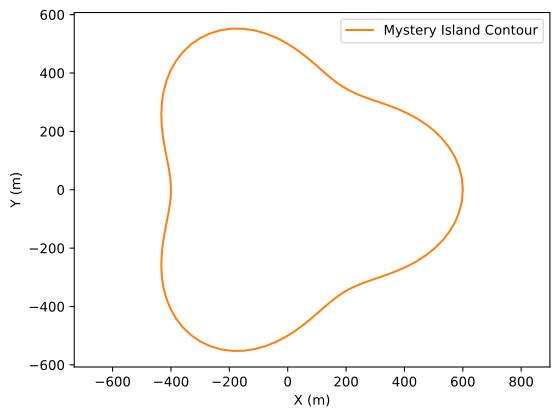
Mystery Island contour
There are tw four steps
We start by setting some values that will be passed to the main function as arguments namely the name of Island and the path to the file where the island contour is stored
# Name of Island
islands = 'Mystery island'

# Path to filename containing contour
fname = "../data/Examples/MysteryIsland.txt"
Second, we set the sub sampling rate of the contour. Often the contours are far too precise for FEM computation at the scale of an entire island.
by default the sub sampling rate is 10 but in the case of Desiradeour Mystery island we will use a sampling rate of 2 for example.
#sub sampling
sub_sampling = 2
Warning
If the contour is complex and the sub sampling rate too low the triangulation will probably fail. This most often comes from the fact that nodes are too close to one another.
Third, we define the parameters of the triangulation
# Triangulation settings
ttype = 'pq33a1000'
The string ttype is composed of three caracters p, q, and a followed by numbers the meaning of which is as follows
p: we are making a planar straight line graph (a collection of segments and vertices);
q: we are (inasmuch as possible) imposing a constraint of 33° angle for the triangles (equilateral triangles);
a: the area of the triangle is less or equal to 1000 \(m^2\).
There are other options and for more detail please refer to https://rufat.be/triangle/index.html
Fourth, we set the recharge \(R\) and Hydraulic conductivity \(K\) that together make the poisson coefficient \(fi\).
# Parameters
# Infiltration
R  = 0.19 # m/year
R = R / 365.25 # infiltration m/d
# Conductivity
K = 2.5e-5*86400 # conductivity m/d

fi = 2 * R * 25 / K / 1025
Warning
\(fi = \frac{2R(\rho_s-\rho_d)}{\langle K \rangle\rho_s}\) is dimensionless so \(R\) and \(K\) have to be given in the same units (meters per day prefered see below).
Eventually once all the parameters have been set we call the
IslandLens()function and pass our parameters as arguments.
u, Th, X, Y, Zm, dx, dy, itp = il.IslandLens( islands = islands, fname = fname,\
    ttype = ttype, fi = fi, sub_sampling = sub_sampling , clockwise = clockwise,\
    lakes= [], plot=True)
Visual outputs are stored in pdf files. They include
A plot of the solution for the water table and sample streamlines
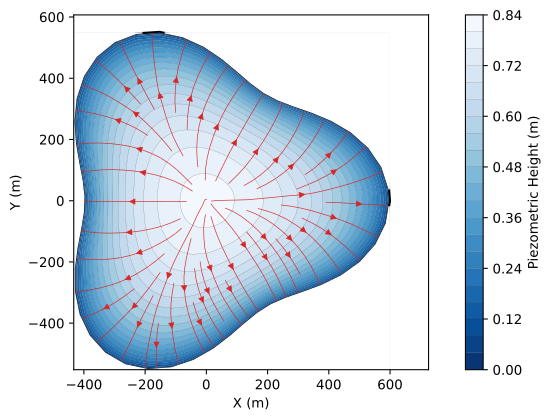
Modeled Water table of Myster Island
A map of the mesh produced by triangle with boundary nodes
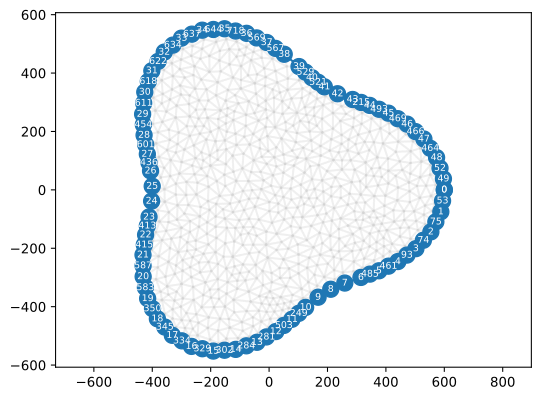
Triang Mesh
The same mesh converted to FreeFem
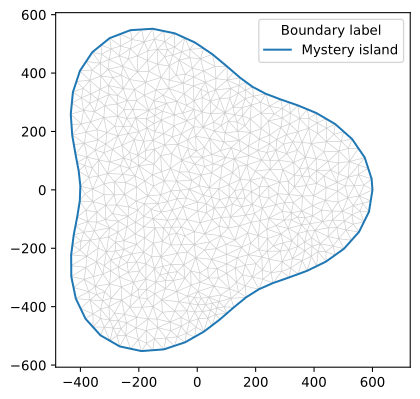
FreFem Mesh
3.1.2. Mass Balance of the Lens
if you wish to produce a csv output with the lens caracteristics (volume, area, recharge) you can use the
IslandBalance()function
il.IslandBalance("Mystery", Zm, dx, dy, R, K)
which will output a csv file with the input parameters, recharge, conductivity, porosity and the calculated lens volume, area and volumetric recharge.
Note
For the time being \(R\) and \(K\) must be given in meters / day
3.2. Island with a lake
Let us now add a lake to ou Mystery Island. The lake is at see level hence its elevation is 0 meter above sea level.
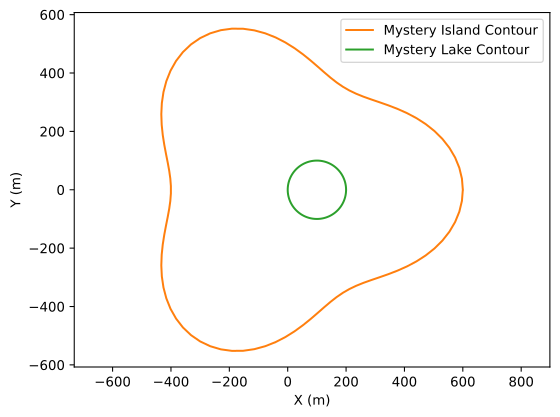
Mystery Island an lake
As for the simple lens we start by defining the parameters before calling IslandLens().
First we define the contour names and file locations
import matplotlib.pyplot as plt

import IslandsLib as il

#####################
# Set arguments
#####################

# Name of Island and path to contour
islands = 'Mystery Island'
island_fname = "../data/Examples/MysteryIsland.txt"

# Name of lake and path to contour
lake = "Mystery Lake"
lake_fname = "../data/Examples/MysteryLake.txt"
Because IslandLens() can handle multiple lakes we creat a lake list called lakes and popualte it with our lake
lakes = [[lake, lake_fname, 0]] # list of lakes with file name and elevation of lake (masl)
We proceed with the parameters need to solve the Poisson equation hence
contour sub_sampling,
Recharge and Conductvity
Poisson coefficient
#sub sampling
sub_sampling = 2

#clockwise
clockwise = False

# Triangulation settings
ttype = 'pq33a1000'

# Parameters
# Infiltration
R  = 0.19 # m/year
R = R / 365.25 # infiltration m/d
# Conductivity
K = 2.5e-5*86400 # conductivity m/d

fi = 2 * R * 25 / K / 1025
With all this set we can call IslandLens()
u, Th, X, Y, Zm, dx, dy, itp = il.IslandLens( islands = islands, fname = island_fname, lakes = lakes, ttype = ttype, fi = fi , sub_sampling = sub_sampling, clockwise = clockwise, plot = True)
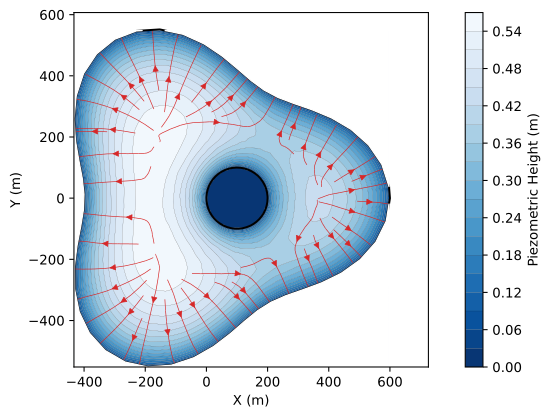
The resulting water table shows the influence of the lake on the water table and flow. If you compare to the same island without lake it is clear that lakes can be of tremendous influence as the impose internal boundary conditions that constrain the solution.
3.3. Island with varying precipitation
Precipitation can vary through space. To include varying precipitation these must be passed to the IslandLens() function as
a scipy RegularGridInterpolator() object
The follwing shows a simple example on how to do this for Mystery island.
We start by opening the island contour file and read it
f = open(fname,"r")

lines = f.readlines()
xi, yi = [], []
for line in lines:
    if line[0] != "#": # skip header
        l = line.strip('\n').split(',')
        xi.append( float(l[0]) )
        yi.append( float(l[1]) )
we then create the smallest grid that includes the island
x = np.linspace(min(xi), max(xi),100)
y = np.linspace(min(yi), max(yi),100)

X,Y = np.meshgrid(x,y, indexing='ij')
We then fill the mesh with a simple distribution of poisson coefficient ratios where the ratio is split between the northern and southern part of the island and create the interpolator. The value of poisson coefficient to the north of the island is twice that of the south.
R  = 0.19 # m/year
R = R / 365.25 # infiltration m/d
# Conductivity
K = 2.5e-5*86400 # conductivity m/d

fi = 2 * R * 25 / K / 1025

Z = X*0 + 1

nx,ny = np.shape(Z)
for i in range(nx):
    for j in range(ny):
        if Y[i,j] > 0: Z[i,j] = fi
        else: Z[i,j] = 0.5*fi

ri = RegularGridInterpolator((x,y),Z) # interpolator to be passed to IslandLens
The interpolator is then passed as an argument to IslandLens()
u, Th, X, Y, Zm, dx, dy, itp = il.IslandLens( islands = islands, fname = fname,\
 ttype = ttype, fi = ri, sub_sampling = sub_sampling , clockwise = clockwise,\
 lakes= [], plot=True)
The interpolator is then used by Islandslib to interpolate values of fi on each node of the freefem mesh and modify the source term in the solution.
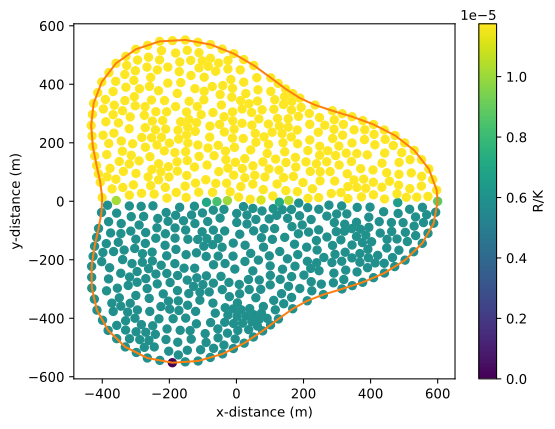
Rainfall distribution
The resulting equipotential map shows the influence of this variable precipitation rates. The map is asymetrical whith the highest head sligthly to the north of the island.
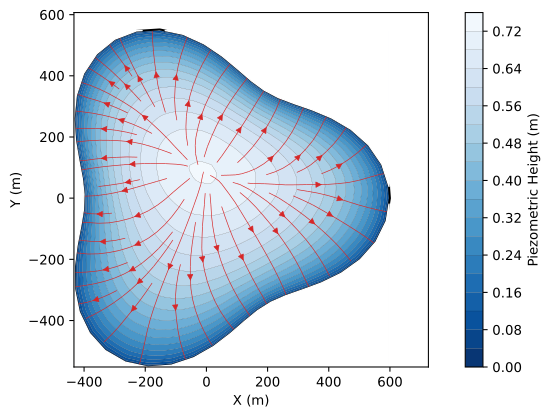
Mystery Island with variable rainfall
3.1.3. Comments
Coordinates must be in metric units (hence UTM for most cases). If you use latitudes and longitudes the modeling will probably work but as the x- and y-distances are not conserved the results will be flawed.
Note that in the case of Mystery island we used realistic values for conductivity taken from the Marie Galante island in Guadeloupe.
For a first try you can set ttype to pq33 before adding an areal constraint. If your area is too small the number of triangles will be to high and the mesh generation will fail